
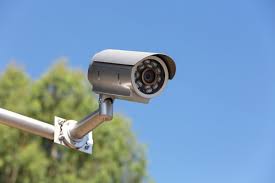
 |
| "Secure your home with our professional CCTV installation services." |
Installing a CCTV system in your home is a powerful way to enhance security and achieve peace of mind. Follow this step-by-step guide to ensure a smooth installation process.
1. Evaluate Your Security Needs
Identify Key Areas for Monitoring
- Focus on entry points like doors and windows.
- Consider driveways, garages, and outdoor spaces.
- Include backyard and side yards for comprehensive coverage.
Select the Right Camera Types
- Dome Cameras: Discreet, ideal for indoor areas.
- Bullet Cameras: Best for outdoor use with extended range.
- PTZ Cameras: Offers flexibility with pan-tilt-zoom capabilities.
2. Choose Your System
Wired vs. Wireless Options
- Wired Systems: Reliable with superior video quality.
- Wireless Systems: Easier to install, but may experience interference.
Consider Resolution and Storage
- Opt for at least 1080p resolution for clear video.
- Decide between cloud storage or local storage like DVR/NVR.
3. Gather Tools and Equipment
Tools You’ll Need
- Drill and bits
- Screwdriver
- Level
- Tape measure
- Cable ties and clips
Essential Equipment
- CCTV cameras
- Appropriate cables (Ethernet or coaxial, depending on the system)
- A monitor or mobile device for viewing footage
- Power supply units
4. Plan Camera Placement
Optimal Height and Angle
- Mount cameras 8-10 feet above the ground.
- Position cameras to eliminate blind spots and maximize coverage.
Proximity to Power Sources
- Ensure cameras are near power outlets or consider battery-operated options.
5. Install the Cameras
Camera Mounting Steps
- Mark the mounting location using a level.
- Drill holes and secure the mounting bracket.
- Attach the camera and adjust the angle for optimal coverage.
Cable Management
- For wired systems, route cables through walls or along baseboards.
- Use cable clips to keep cables tidy and secure.
6. Configure the Recording System
Connect the Cameras
- Follow the manufacturer’s instructions to link cameras to the DVR/NVR.
Adjust Settings
- Set up recording schedules, motion detection, and alerts based on your security needs.
7. Test the System
Verify Coverage
- Check all camera angles to ensure full coverage of desired areas.
Assess Video Quality
- Review the footage to ensure clarity and adjust settings for optimal performance.
8. Maintain Your System
Routine Inspections
- Regularly inspect cameras and connections.
- Clean camera lenses to avoid obstructions.
Keep Software Updated
- Regularly update firmware and software to maintain security and performance.
Conclusion
A well-installed CCTV system is a crucial component of home security. By following this guide, you can ensure a successful setup that will protect your home for years to come. Regular maintenance and updates are key to keeping your system in top working condition.
Home CCTV Installation: A Comprehensive Guide
![Home CCTV Installation: A Comprehensive Guide]() Reviewed by Bilal
on
July 16, 2024
Rating:
Reviewed by Bilal
on
July 16, 2024
Rating:
No comments: